 Up
UpIntroduction
Note: The application makes extensive use of context-menus and tooltips (pop-up notes). So, the best way to see what options you have in each situation, is to press the right mouse button to get the context-menu, and pay attention to those notes that appears briefly when you stop the mouse cursor over certain areas.
§1 Some preliminary concepts
OrganiZATOR rest over three concepts whose understanding is crucial to get real benefit and avoid the risk of believing that the application is possessed by the devil at a given point. These are:
-
User (and its associated concept access level)
-
Application zone
-
Working area
§2 Users
To use OrganiZATOR it is necessary to access as a registered user, and each user has:
-
Username
-
Password
-
Type/Access Level.. These terms are equivalent and define the privileges (what the user can do).
There are 4 types, each with different privileges, which are fixed for each type.
| Level | Type (alias) | Privileges |
| 4 | Guest | Read-only options; can not perform actions involving delete, create or modify data. You can create as many users of this level as desired. |
| 3 | Owner | It is the ordinary user. It can create and modify items. You can create as many users such as may be required. |
| 2 | SuperUser | You can hide certain data (encrypt) and have access to them (this information
is not accessible to the types 3 and 4) [1]. Including the prerogatives of the previous levels plus some its own. There can be only one super user in each database [2]. |
| 1 | System operator (SysOp) | It can create and modify users. Including the prerogatives of previous levels. There can be only one system operator in each database [3]. |
As can be seen, the lower levels have more privileges than to the highest. The
highest privilege level (1) corresponds to the System Operator.
By default there are four users, one of each type, whose names can not be changed or deleted.
 It is advisable to change
its initial default passwords by other (see
Access Keys), but remember that if you lose the System Operator's password you
may lose some data. Names and passwords for these defaults users are indicated:
It is advisable to change
its initial default passwords by other (see
Access Keys), but remember that if you lose the System Operator's password you
may lose some data. Names and passwords for these defaults users are indicated:
| Level | Type | User name | Password |
| 4 | Guest | guest | guestusr |
| 3 | Owner | owner | DISABLED |
| 2 | Super User | super | superUsr |
| 1 | System Operator | sysop | sysopPsw |
Note: Both the username and the Password are case sensitive.
If the password of the Owner is equal to "DISABLED", then the application does not ask for a password to access as Owner (level 3). In other words, anyone can create and / or modify items in the database (as you can see, by default everyone has full access, read/write, to the database). Similarly, if the Guest's password is equal to "DISABLED", then no password is required to access as a guest, and anyone can log to see the contents of that dBase.
Note: when the password = DISABLED, we say that the access as Owner or Guest is public. Accesses as Super User and System Operator may not be public in despite of the value used for their passwords.
For each dBase there can be only one Super User and one System Operator (SysOp); however there may be as many users with Owner and Guest privileges as desired. The access conditions of each dBase are separate, and distinct from those who may have other dBases defined in the system [4].
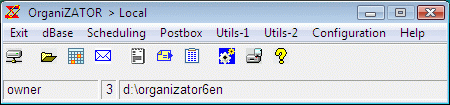
Figure 1. |
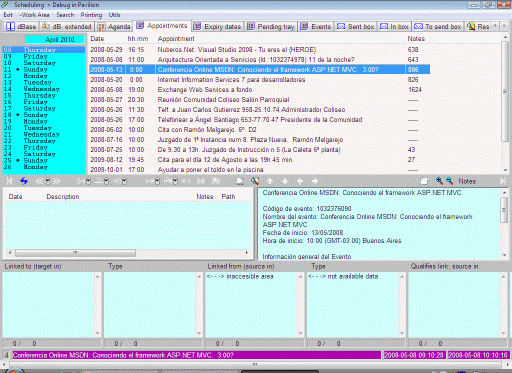
Figure 2. |
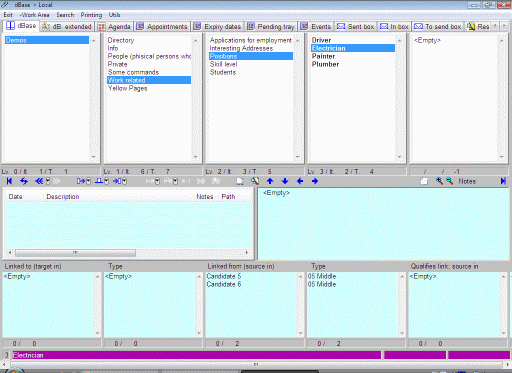
Figure 3. |
§3 Zones
The application has four different zones:
- Initial (main): is displayed when starting the program (Figure 1). It contains several options, including access to the other three: Scheduling; Postbox and dBase. From here you can access to some support utilities, as Notebook; defining work areas; initial parameters; creation of users; definition of frequent used data; definition of executables, and so on.
- Scheduling includes Appointments; Expiry Dates; Pending tray, and Events (figure 2). Everything that composes a planner, including one-page summary (Agenda) with the events to remember every day.
- PostBox: includes the Zator messaging system; Sent messages; messages Inbox and messages Outbox (messages pending to be sent) [5].
- Database (dBase): heterogeneous information in areas not covered above, including your emails (Fig. 3).
Keep in mind that OrganiZATOR is an application rather ubiquitous and that at any given time,
each zone of
the application may be using a different work area
(see below). For example, the PostBox can messages located in some place
of the intranet, where the other users have access; the scheduling might be showing data planning of
your boss, which
are located on a computer in the office next to yours; and the dBase may
be looking at the database of customers, a file located in any of the network. While the Notebook that has opened, contains yours own
notes; data stored
on your computer, in the same directory as the file zator5.exe who launched
the application.
§4 Work areas
The concept of work area is related to the fact that Zator is a distributed database that can use storage units (databases) located in different places. Each of these Zator dBases (zBase) is reflected in a zDB1 file housed in a directory somewhere in the intranet (LAN), and provides a work area. Every zBase can be accessed locally by the executable located in the same directory (for which serve as local area) or remotely, by an executable running in a different directory (in the same node or another point of the network), for which acts as a remote area for that executable.
What better explain with an example: suppose an office with a professional chief and his secretary; there are two computers connected to a small LAN of two nodes; BOSS is a computer and the other HELP. Installs OrganiZATOR in, say C:\Zator\ in each node (two installations) and both directories are visible from the other node.
When start the application in their respective computers, both the chief and his secretary are in their local area, using respectively the dBases \\BOSS\C\Zator\zDB1 and \\HELP\C\Zator\zDB1, but defining working areas properly, each one can connect with the other dBase (remote to him), so that from the connection, things happen as if they were physically sitting on the desktop of the other. Simultaneously, it may have set a third work area in another situation, which could be a specific directory of the BOSS machine; the HELP machine, or a third connected to the network. Latter directory in turn contain other zBase (file \\SOME\place\zDB1) who act as a remote area for both users. The creation of this, or other similar areas, it does not require a new installation of the application, and can be performed from any of the stations mentioned (this needs access as superuser). The connection to a remote area of work is reversible, so that at any time you can go back to your local area, or jump to another of which the network has identified.
As expected, this ubiquity is complemented by an access system in which can be defined who can
access each area, and how (what level). We can advance here that the process is to
define in each zBase a list of users have access to it, and the level assigned to
each. As stated above, the process of creating new user is only allowed to the
System Operator  .
.
Each zone of OrganiZATOR provides a option to change its work area. The
menu for the main zone is located at Utils-1 >> Work-area
in main-zone of the menu bar, and also the button  in the toolbar of the main window. Besides this, the general
window for the other zones (dBase, Scheduling and Postbox) contains a Work area
option in the menu bar that allows you to change individually the work area for
each zone, or all at once.
in the toolbar of the main window. Besides this, the general
window for the other zones (dBase, Scheduling and Postbox) contains a Work area
option in the menu bar that allows you to change individually the work area for
each zone, or all at once.
Note: the options presented by the mentioned menus are the same for the four zones, and must be defined by the user through the appropriate option (Maintaining work areas).
Because they are independent of one another, at any given time, every zone of the application (main, dBase, Scheduling and Postbox) can be connected to any area, local o remote. In any case, some options in the main zone are always executed on the local dBase whatever what area is connected.
Main options that are always executed using the data contained in the local area:
Notebook
Menu to run executables
Menu to send messages
.
Security routines (save backup
and restore backup).
Menu to connect with other work areas
Define page of Frequent Used Data.
See page of Frequent Used Data
Maintenance routines (Check integrity; Rebuild & Compact; Reindexing).
To define Work Areas.
To define Commands Catalog.
To define Messaging Addresses.
Create user.
Erase user.
To define passwords for the standard users (Guest; Owner; SuperUser and SysOp).
To define initial parameters (settings).


 Top.
Top.[1] The choice of encrypt/decrypt fields is not available in this version.
[2] The SuperUser of each dBase can be the person who has it in its local area (its default directory), or the person directly responsible for its maintenance. Usually you access to yours dBase as Owner, but for certain actions you should access as Super User, whose privileges will allow you to access certain options who are vetoed as Owner.
[3] Ideally, the System Operator (SysOp) of all dBases defined in a facility, LAN in the office, department, business, etc., should use a single password; the same for all of them, which will be entrusted to the maintainer of the system; network administrator or similar. The idea is that there may be only one responsible for security, integrity, and political of use in the installation.
[4] Although not required, it is desirable and practical to maintain a certain consistency in access protocols of the various dBases that may exist in the system. In other words, use the same username and the same password in all the bases to which a user has access (see that Zator facilitates this control because in defining new areas, the new ones will inherit the user profiles in the station from which the expansion takes place).
[5] Do not confuse this messaging system (intended for a local area network) whit the email client integrated in the dBase. Both are independent services